


Classiq's Quantum Engineering Agents, Now in Your IDE and the Platform


Today we're releasing two new ways to work with Classiq's quantum engineering agents. A plugin that brings them into your own development environments, and an assistant in the Classiq platform that runs with no setup at all.
We introduced these agents in April. Today is the next step: putting them where your quantum work already happens.
Classiq in your IDE
If you build in Claude Code, Cursor, Cline, or Codex, you can now bring Classiq's quantum engineering into your project directly where you work today.
Install it with two commands:
/plugin marketplace add Classiq-Technologies/classiq-plugin-marketplace
/plugin install classiq-quantum-engineer@classiq
Restart your IDE and approve classiq-mcp on first use.
The agent works directly in your codebase, across your files and Git history. Describe a problem and it builds a Qmod model, synthesizes it into a hardware-optimized circuit, executes it, and walks you through the results, all in your editor. A bundled MCP server keeps it current on Classiq's APIs.
It's built for the harder problems: paper implementations, research, and multi-step applications you refine over time. In our own testing, that's where it pulls ahead of general-purpose coding tools, and the tougher the work, the wider the gap.
Straight from the platform, no setup
Not every quantum problem starts in a codebase. When you just want to go from an idea to a circuit, the Classiq Assistant runs in the platform, no setup, no IDE. Describe it in plain language, or upload an image, and get back a working circuit.
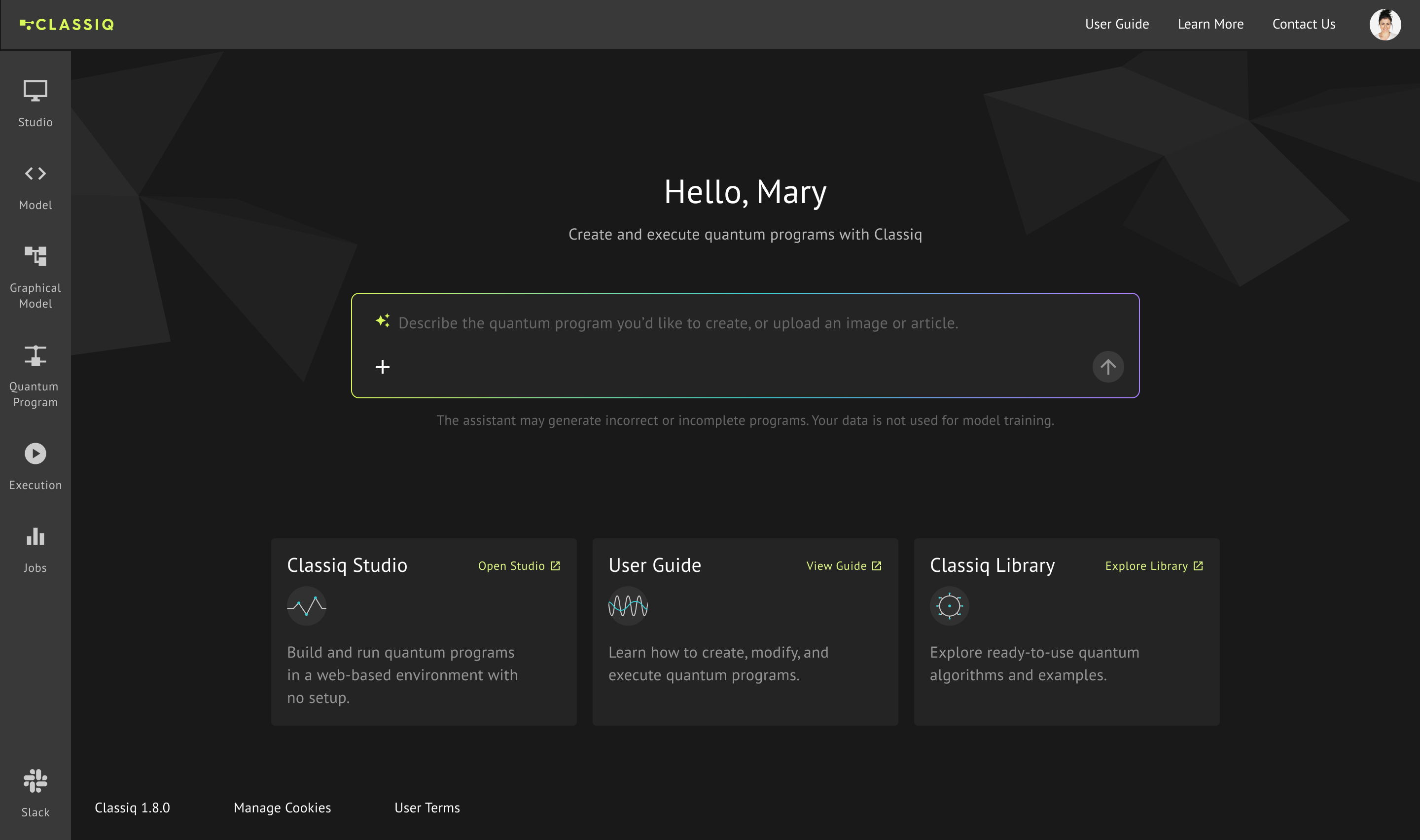
The assistant builds a Qmod model, synthesizes it into a quantum program, and opens it in the Quantum Program page. From there you keep working in the same conversation: ask it to explain the circuit, predict the results you should expect, or refine the model. When you're ready to run, Execute takes you to the Execution page to pick a backend.
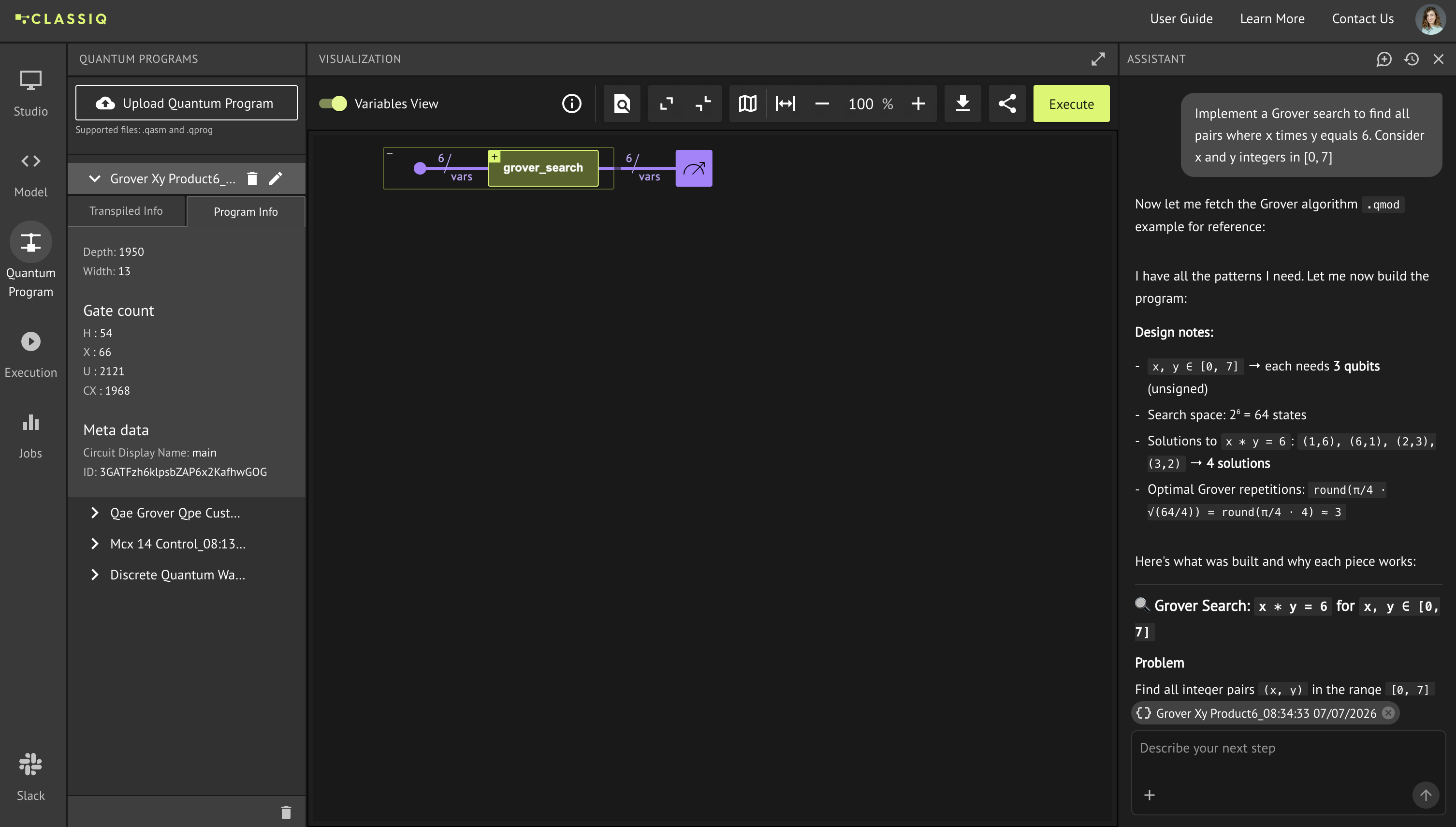
It's focused by design. The assistant models and synthesizes. It doesn't run circuits, configure backends, or interpret results. You do that in the platform, the way you do today. Clear, direct descriptions work best, and it's worth reviewing any program before you run it.
The rest of the platform is unchanged. Your work in Studio and the SDK continues exactly as before. This just adds a faster way in.
The context behind the agent
The model isn't the advantage. Any tool can call a model. What sets Classiq apart is the context the model works with.
Qmod lets the agent work at the level of intent. Language models are good at expressing high-level, composable intent, and less suited to gate-level bookkeeping like qubit indexing, uncomputation, and ancilla reuse. Qmod, our quantum language, lets the agent describe what to build. Our synthesis engine handles how, compiling that intent into a runnable, hardware-optimized circuit. The agent stays where it's strongest, and leaves the low-level steps to the compiler.
The Classiq Library gives the agent curated context to build from. It's a large, open-source, tested collection of quantum functions and algorithms spanning fourteen algorithm categories and twelve domains - and growing. Rather than rebuilding QPE or Grover from raw gates each time, the agent draws on validated, canonical components. Our own quantum algorithm and application specialists curate the library and keep it current, so the context the agent reasons from reflects real expertise rather than whatever a public dataset happened to include.
Ongoing evaluation keeps the agent improving. We treat agent quality as an engineering discipline. Our specialists build the benchmarks the agents are measured against, run them continuously, and review the results, with checks that catch a change before it can quietly break something that worked before. Because the same skills and context power more than one agent, an improvement to one tends to help them all.
Put simply, the harder the problem, the more that curated context matters. The agent reasons at the right level, with knowledge a team of quantum specialists keeps current.
Where this is heading
We're continuing to build agents into the heart of the Classiq platform.
The team is actively working on agents that work across the entire platform: modeling a problem, synthesizing it, executing it, and interpreting and optimizing the results. One quantum engineer, reached two ways, in the platform and in your own projects, on the foundation behind everything above. Through 2026, we'll keep shipping updates and new agent capabilities on the way there.
Today's two releases are part of that work, and both are available now.
Get started
Try the assistant. Available now in the Classiq platform for accounts with an active subscription.
Get the plugin. Available for enterprise and early-adopter accounts. Talk to us about access.
Read the documentation at docs.classiq.io.
Today we're releasing two new ways to work with Classiq's quantum engineering agents. A plugin that brings them into your own development environments, and an assistant in the Classiq platform that runs with no setup at all.
We introduced these agents in April. Today is the next step: putting them where your quantum work already happens.
Classiq in your IDE
If you build in Claude Code, Cursor, Cline, or Codex, you can now bring Classiq's quantum engineering into your project directly where you work today.
Install it with two commands:
/plugin marketplace add Classiq-Technologies/classiq-plugin-marketplace
/plugin install classiq-quantum-engineer@classiq
Restart your IDE and approve classiq-mcp on first use.
The agent works directly in your codebase, across your files and Git history. Describe a problem and it builds a Qmod model, synthesizes it into a hardware-optimized circuit, executes it, and walks you through the results, all in your editor. A bundled MCP server keeps it current on Classiq's APIs.
It's built for the harder problems: paper implementations, research, and multi-step applications you refine over time. In our own testing, that's where it pulls ahead of general-purpose coding tools, and the tougher the work, the wider the gap.
Straight from the platform, no setup
Not every quantum problem starts in a codebase. When you just want to go from an idea to a circuit, the Classiq Assistant runs in the platform, no setup, no IDE. Describe it in plain language, or upload an image, and get back a working circuit.
The assistant builds a Qmod model, synthesizes it into a quantum program, and opens it in the Quantum Program page. From there you keep working in the same conversation: ask it to explain the circuit, predict the results you should expect, or refine the model. When you're ready to run, Execute takes you to the Execution page to pick a backend.
It's focused by design. The assistant models and synthesizes. It doesn't run circuits, configure backends, or interpret results. You do that in the platform, the way you do today. Clear, direct descriptions work best, and it's worth reviewing any program before you run it.
The rest of the platform is unchanged. Your work in Studio and the SDK continues exactly as before. This just adds a faster way in.
The context behind the agent
The model isn't the advantage. Any tool can call a model. What sets Classiq apart is the context the model works with.
Qmod lets the agent work at the level of intent. Language models are good at expressing high-level, composable intent, and less suited to gate-level bookkeeping like qubit indexing, uncomputation, and ancilla reuse. Qmod, our quantum language, lets the agent describe what to build. Our synthesis engine handles how, compiling that intent into a runnable, hardware-optimized circuit. The agent stays where it's strongest, and leaves the low-level steps to the compiler.
The Classiq Library gives the agent curated context to build from. It's a large, open-source, tested collection of quantum functions and algorithms spanning fourteen algorithm categories and twelve domains - and growing. Rather than rebuilding QPE or Grover from raw gates each time, the agent draws on validated, canonical components. Our own quantum algorithm and application specialists curate the library and keep it current, so the context the agent reasons from reflects real expertise rather than whatever a public dataset happened to include.
Ongoing evaluation keeps the agent improving. We treat agent quality as an engineering discipline. Our specialists build the benchmarks the agents are measured against, run them continuously, and review the results, with checks that catch a change before it can quietly break something that worked before. Because the same skills and context power more than one agent, an improvement to one tends to help them all.
Put simply, the harder the problem, the more that curated context matters. The agent reasons at the right level, with knowledge a team of quantum specialists keeps current.
Where this is heading
We're continuing to build agents into the heart of the Classiq platform.
The team is actively working on agents that work across the entire platform: modeling a problem, synthesizing it, executing it, and interpreting and optimizing the results. One quantum engineer, reached two ways, in the platform and in your own projects, on the foundation behind everything above. Through 2026, we'll keep shipping updates and new agent capabilities on the way there.
Today's two releases are part of that work, and both are available now.
Get started
Try the assistant. Available now in the Classiq platform for accounts with an active subscription.
Get the plugin. Available for enterprise and early-adopter accounts. Talk to us about access.
Read the documentation at docs.classiq.io.